
Manage. Analyse. Control the risk. Trade. All from one place.
Brokers, exchanges and wallets in one picture, risk measured against your profile, and your positions drawn on the chart you trade from.
Create an accountFree and open to everyone · no card needed
- 13brokers and exchanges
- 31indicators
- 18screens
- Macnative app
Works with
 Binance
 MEXC
 Bybit
 OKX
 Kraken
 Coinbase
 KuCoin
 Bitget
 Gate.io
 Bitunix
 Bitvavo
 Blofin
What Arvenyx does
-
One portfolio
Brokers, exchanges and wallets in a single live picture.
-
Risk that fits your profile
MiFID test, limits and deviations, in one report.
-
A terminal that remembers
Six chart types, bar replay, drawings, indicators, and price, trend-line and indicator alerts that never expire.
-
Research
Funds and ETFs ranked by what you can stomach, gurus' 13F, insiders and Congress.
-
Markets at a glance
S&P 500 map, crypto, currencies, liquidations and calendar.
-
Trading with a review step
Every order goes through a confirmation with your portfolio's pre-trade check.
For TradingView users
Coming from TradingView?
Bring your Pine scripts and watchlists, and get what TradingView doesn't give you right next to them: your portfolio.
- Indicators and strategies compatible with Pine Script®, with backtests
- Long and short positions with partial TPs and the orders worked out
- USDT.D, TOTAL and OTHERS, computed here
- Import your TradingView watchlist file
How it works
- 01
Connect or import your portfolio
- 02
Take the suitability assessment
- 03
Watch, monitor and trade from the terminal
How it looks
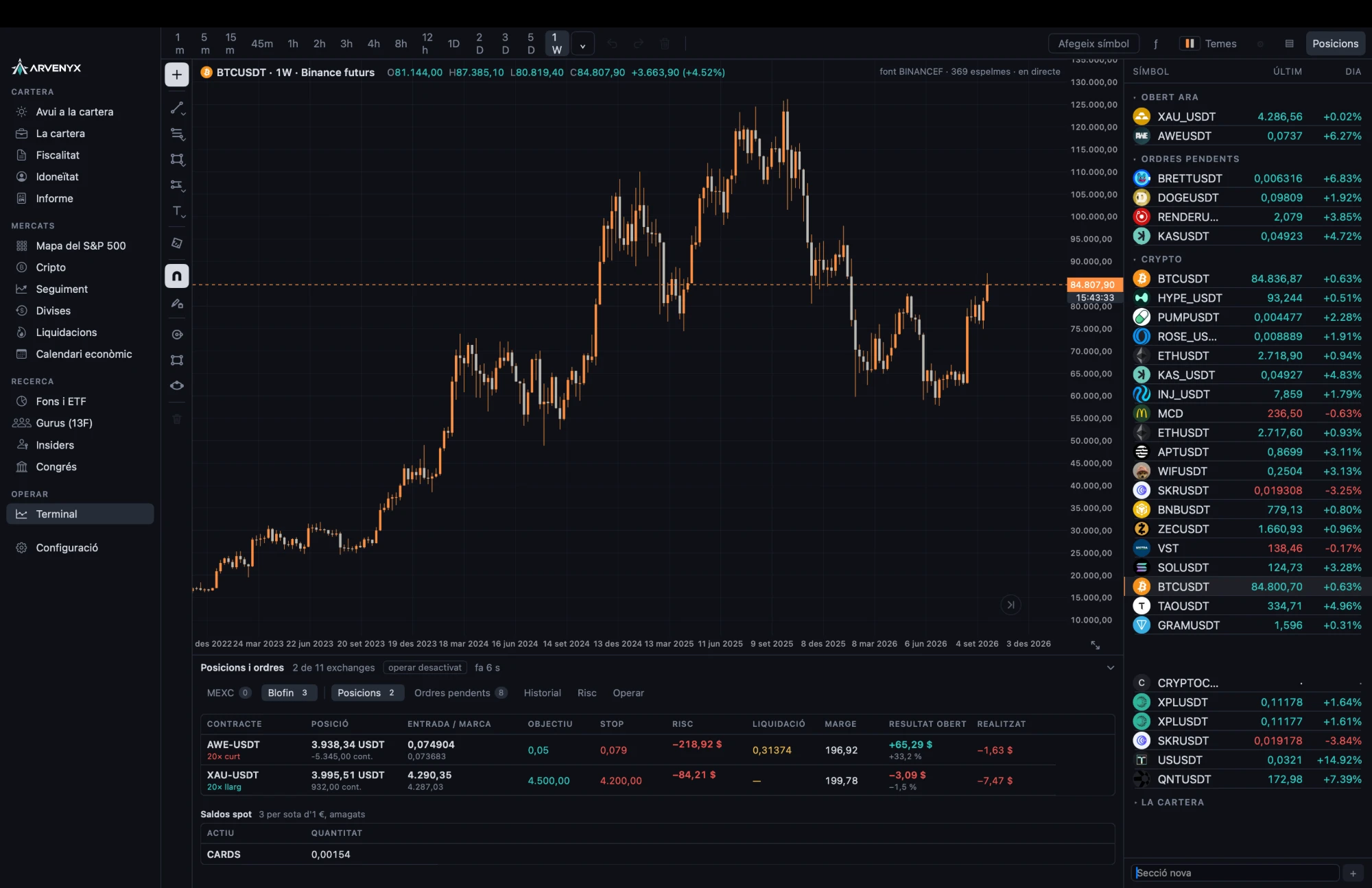
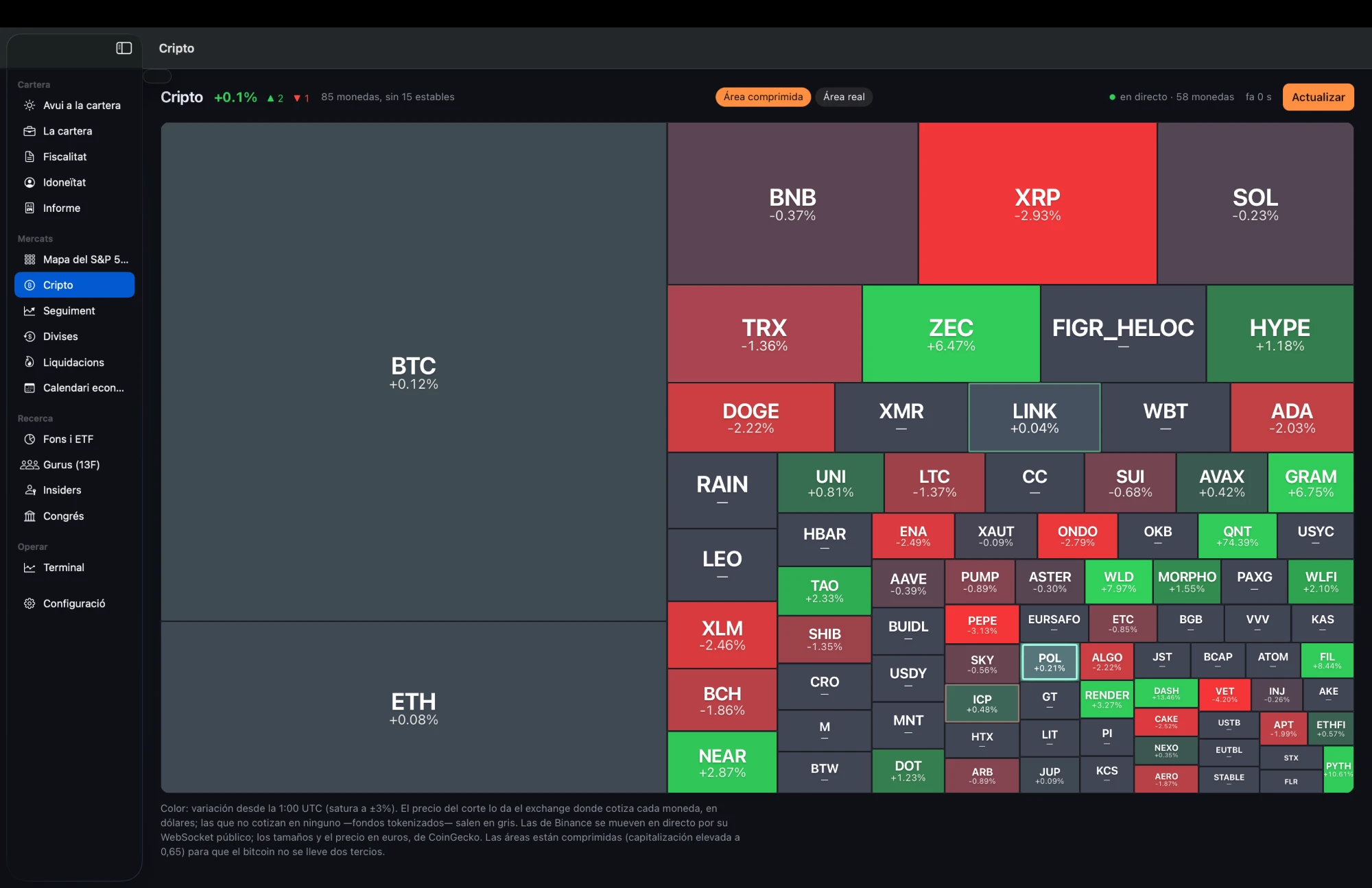
Native app
Arvenyx for Mac
The terminal without a browser: faster, with a live chart and every screen of the app one click away.
- Native live chart, no waiting
- The same drawings, indicators and Pine scripts as on the web
- Long and short positions with risk/reward and partial take-profits
- Tells you when there's a new version
Version 1.53 · macOS 13+ · Apple Silicon and Intel · 18 MB
You need an Arvenyx account to sign in. Create an account
The first time you open it
- Open the .dmg file and drag Arvenyx into the Applications folder.
- Open it. If your Mac says it can't verify it, go to System Settings › Privacy & Security and click “Open Anyway”.
- Sign in with your Arvenyx password.
During the beta the app isn't signed by Apple yet; it will be before launch.
Price
Free account
Open to everyone
- Everything included
- No card
- We'll tell you before charging anything
Paid plans will be announced once we finalise the data licences.
Public data
Free, no sign-up, with the source of every figure shown.
- 13F portfolios
- The portfolios of the best-known investors, from each quarter's 13F.
- Insiders (Form 4)
- What the insiders of US companies buy and sell.
- US Congress
- The stock trades that members of the House of Representatives disclose.
- Weekly summary
- Congress and insiders, week by week, on a single page.
- Earnings calendar
- Earnings calendar for US companies: EPS estimate and actual, surprise and price reaction.
- S&P 500 Heatmap
- The 500 companies of the US stock market by sector, sized by market cap and coloured by the day's move.
- Liquidation map
- Where leveraged positions in Bitcoin and five more cryptocurrencies would be liquidated: an estimate from Binance public data.
- Spanish stock market
- Every stock on the Madrid stock exchange with its price, day change and a map by sector, delayed.
- Dividend calendar
- Upcoming dividends of Spanish continuous market companies, with dates, gross amount and yield.
Questions
- Is it an adviser?
- No. It organises, calculates and shows; it doesn't recommend.
- Where does the data come from?
- From the exchanges, DEXs (DexScreener and GeckoTerminal) and Yahoo. Prices are indicative.
- Can I trade?
- Yes: spot on Binance, Kraken and OKX, always with a confirmation first.
- Is there an app?
- Yes: for Mac, which you will find right here under “Arvenyx for Mac”, and the iPhone and iPad app is in beta.
- Does it tell me which funds to buy?
- No. “Funds that match your profile” is a filter with criteria you can see (risk, cost, assets and history), and the AI only explains why a fund passes it. This is not investment advice or a recommendation.
- Can I use Pine scripts?
- Yes: the terminal understands most Pine Script syntax for indicators and strategies, with the backtest report.
- Is there an earnings calendar?
- Yes: who reports today and this week, with EPS estimate and actual and the price reaction, open to everyone under «Earnings»; with an account, filtered by your stocks and on every stock page.
- Do I need to sign up?
- Yes, with your email and a password. It's free and open to everyone: confirm your email with the link we send you and you're in. You can delete the account whenever you like from Settings.
Create your account
Free and open to everyone. Confirm your email with the link we send you and you're in.
Arvenyx organises, calculates, documents and displays risks according to the limits configured by the adviser. It does not issue investment recommendations.
Investing carries a risk of losing capital.